FABRivetFAB

    Track Every Piece.Ship On Time.

    Stage-gate fabrication tracking from queue to site delivery. Mark number traceability, QR code scanning, and real-time status for every component.

    Start free during beta

    No credit card required · Works on any device

    Mark B-214QR
    • Queue
    • Fit-Up
    • QC Before Ship
    • Ship to Site
    Advance stage

    From queue to the site

    Nine stages, a mark number, and a heat number on every piece.

    Stage-Gate Tracking

    Follow every component through a 9-stage pipeline from Queue to Ship to Site. One-click stage advancement with audit trail.

    • 9-Stage Pipeline
    • One-Click Advance
    • Stage Notes
    • Audit Trail

    Component Management

    Track mark numbers, heat numbers, material specs, and dimensions. Bulk CSV import gets your data in fast.

    • Mark Numbers
    • Heat Numbers
    • Material Specs
    • CSV Import

    Shipping & Delivery

    Assign trailer numbers, delivery locations, and track received-by confirmations. Complete shipping history for every piece.

    • Trailer Numbers
    • Delivery Locations
    • Received-By
    • Shipping History

    Mobile Ready

    Scan QR codes and advance stages from any device — phone, tablet, or desktop. No download needed.

    • Phone Camera
    • Any Browser
    • Home Screen
    • Stage Advance

    Track every type of fabrication

    From structural steel to custom fabrications — full material traceability.
    • Structural Steel
    • Miscellaneous Metals
    • Stairs & Railings
    • Precast Concrete
    • Mechanical Assemblies
    • Ductwork & Piping
    • Custom Fabrications
    • Sheet Metal Components
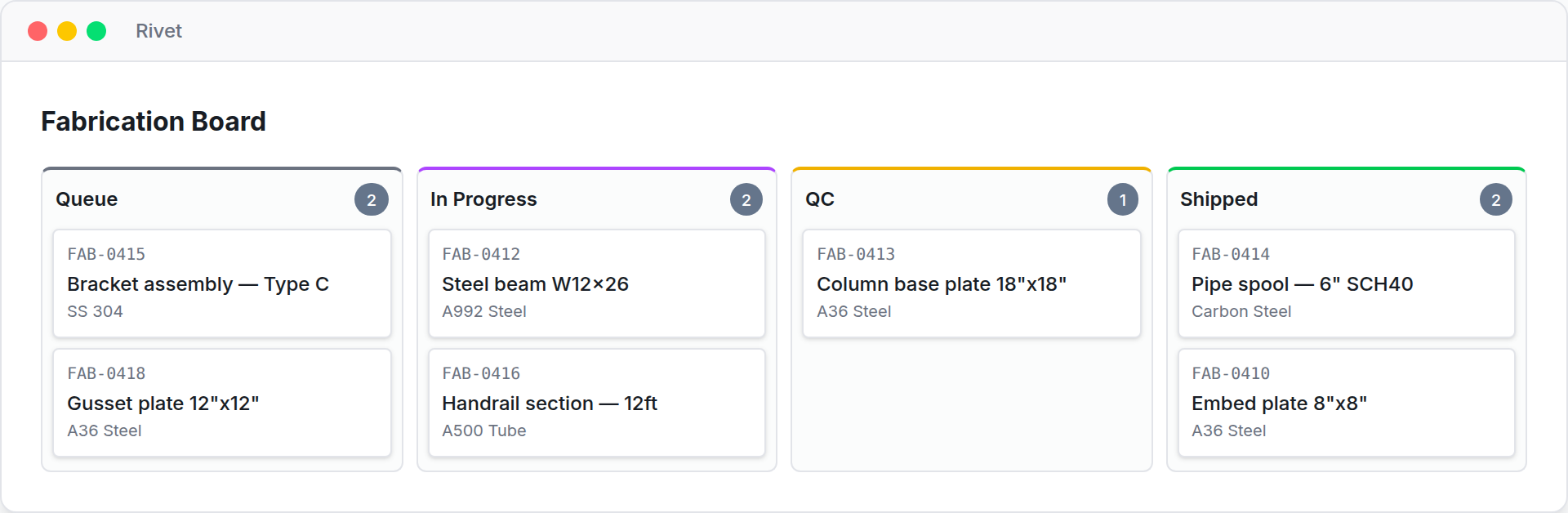
    RivetFAB fabrication board showing pieces moving through queue, in progress, QC and shipped stages
    • 9

      Stage Pipeline

    • Free

      While in Beta

    • 100%

      Cloud-Based

    QR Code Scanning

    Instant component lookup

    Every component gets a unique QR identity the moment it's created. Scan on the shop floor to instantly see stage, specs, and history.

    Bulk CSV Import

    Get data in fast

    Import your component lists, mark numbers, heat numbers, and specs from a CSV file in seconds.

    Shipping Management

    Track every delivery

    Assign trailer numbers, delivery locations, and capture received-by confirmations at the site.

    Try the interactive demo

    Share status with clients and GCs

    Share a read-only progress portal with your GC, clients, or inspectors — real-time fabrication status for the shared project, no account needed.

    Real-Time Status

    Clients see live fabrication progress for their project components without needing an account.

    Stage Visibility

    Every component's current stage, completion dates, and shipping status — all in one view.

    Drafted by AI

    AI Drawing Import

    Snap a photo of your detail sheets and AI extracts marks, quantities, dims, and specs — components created in seconds.

    • Full VisibilitySee every component's status at a glance across all stages
    • Ship On TimePriority-based workflows keep fabrication moving on schedule
    • Complete TraceabilityMark numbers, heat numbers, and full audit trail for every piece
    • QR Code ScanningScan components on the shop floor to instantly update status

    Free while RivetFAB is in beta

    Free Beta

    Unlimited components and heat numbers, and shop logins shared with no per-seat games, while RivetFAB is in beta.

    Free during beta. When it launches, it converts to a paid plan at list price — with 30 days’ notice first, and your data stays either way.

    Start free during beta
    • Free while in beta
    • No credit card required
    • Works on any device
    See all features

    Frequently asked questions

    What are the 9 fabrication stages?
    RivetFAB tracks components through: Queue, Layout, Fit-Up, Weld Out, QC Before Ship, Ship to Finish, Rec'd from Finish, Finish QC, and Ship to Site. Every transition is stamped with date, user, quantity, and notes — and you can add custom fields to match how your shop works.
    Does RivetFAB support QR codes?
    Yes. Every component gets a unique QR identity the moment it's created — scan with any phone camera to view status, advance stages, or add notes. No app download needed.
    Can I import my existing component data?
    Yes. RivetFAB supports bulk CSV import so you can get your existing component lists, mark numbers, and heat numbers into the system quickly. You can also export to CSV and PDF at any time.
    How does heat number traceability work?
    Every component in RivetFAB can be linked to a heat number, material spec, and UOM, with a stage-by-stage audit trail — every move stamped with who, when, and how many. Essential for QA/QC compliance.
    How much does RivetFAB cost?
    RivetFAB is free for every organization while it is in beta — unlimited components and heat numbers, and unlimited users, so shop logins can be shared with no per-seat games. Free during beta. When it launches, it converts to a paid plan at list price — with 30 days’ notice first, and your data stays either way.
    Does RivetFAB work on mobile?
    Yes. RivetFAB is a web app that works in any browser — phone, tablet, or desktop. You can add it to your home screen for app-like access. QR scanning uses your phone camera directly.
    Can clients or GCs see fabrication status?
    Yes. Share a read-only progress portal with your GC, client, or inspector — no account needed. Viewers see real-time fabrication status for the shared project only.

    Track Every Piece. Ship On Time.

    Stage-gate fabrication tracking from queue to site delivery. Mark number traceability, QR code scanning, and real-time status for every component.

    Start free during beta

    No credit card required